

So it’s been roughly a month since I started on this project and things are getting pretty serious, after talking to some people I began working on an Android app [might make an iOS app later but as it stands I don’t have the licence for that]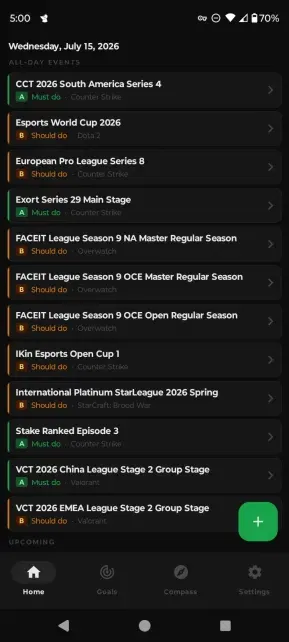
People who’ve been following this story [Part 1, Part 2, Part 3] would know I’ve been trying to find a way to balance my serious coding with my more relaxed and calm lifestyle. Well, looks like I got further than I expected. I took the basic Android OS system calls and was able to make a simple tool to parse my ICS files.
Even using the iCalendar and CalDAV web standards, I was able to recreate the majority of the features I wanted in my app.
RFC 5545 titled “Internet Calendaring and Scheduling Core Object Specification (iCalendar)” dated September 2009 gave me a lot to work off, see the standard gave me things such as Property, To-Do Component, Time Zone Component and even a Free/Busy option.
I also was able to take some ideas from March 2007’s Calendaring Extensions to WebDAV (CalDAV) known as RFC 4791.
Let’s talk about a few things that I’ve learned during this project.
First thing off the bat, I learned a bit of Kotlin, as that’s what I was recommended to use alongside the fact that Kotlin was built into Android Studio. The other reason I decided to try and learn Kotlin was the fact that it could target multiple platforms such as Windows [majority of business users] alongside iOS [the operating system a lot of people I know use on their phones].
Luckily for Linux users, Kotlin can also be used for that, which comes in handy as a lot of my understanding of time management comes from “Time Management for System Administrators” by Thomas A. Limoncelli, “The 7 Habits of Highly Effective People” by Stephen R. Covey, and “The Dilbert Principle” by Scott Adams.
“Time Management for System Administrators” gives a lot of advice that borrows from Linux terms and concepts like cron jobs and such.
So of course Linux would be on my priorities for later, since most System Administrators feel more at home in Linux than in Windows.
The second hurdle I had to leap over was the idea of how to handle parsing. As the people following this project would no doubt be aware, I began this project back in Part 1 as a way to not step on anyone’s IP or trademarked ideas, since I needed a custom drop-in solution covering compass, task lists, missions, goals, and values to be a full replacement for my Palm OS Franklin Planner into something that could move beyond the upcoming “Palm Day” flaw, an issue similar to Y2K where Palm devices can only hold dates up until 23:59 on 12/31/2031, making any Palm device an invalid option going forward.
But why am I rehashing this? If you read Part 1 of this article series you’d know that already.
Well, thankfully I got it working, but now I face this odd moment where I have this amazing piece of software that’s 99.5% ready for release, but I really want to see if I can pitch my software to the current owners of the Franklin Planner branding and IP, FPC [The “Franklin Planner Corporation,” who took over the branding as far as I can tell in November 2019], as a possible white-labeled application.
There is a clear market for this. Some of us don’t want cluttered, over-designed software, we just wanna keep using the old Franklin Planner system we’ve loved for years.
I am thinking for the 1.0 release to have bidirectional sync options for things like Exchange, which is still huge in the corporate world, but for now I am glad with what I have, and after 3 days I’ve yet to have a crash happen.
Comments (0)
No comments yet.